CloseAtTrailingStop

The CloseAtTrailingStop method provides the opportunity to use what is known as a trailing stop – this is a stop that gets pulled up with the price if it moves in the direction favorable for the position. For example, for a long position, if the price rises, the stop is pulled higher and higher and this happens until the price retreats by the value set by the stop.
public void CloseAtTrailingStop(Position position, decimal priceActivation, decimal priceOrder, string signalType)1. position – the position for which the stop needs to be moved;
2. priceActivation – the price upon reaching which a real order will be sent to the exchange;
3. priceOrder – the price for the executing order;
4. signalType – the type of signal for closing the position;
Let's look at the code:
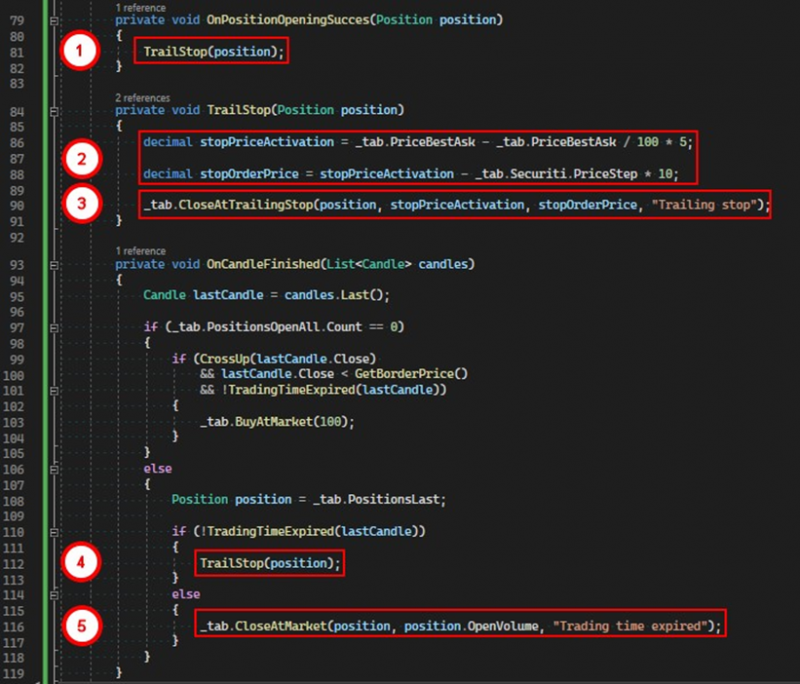
1. After receiving the event of successful position opening, the TrailStop method is called.
2. In this method, we calculate the order activation price and the price for the order itself.
3. Call the CloseAtTrailingStop method, passing the necessary parameters.
4. As long as the trading day has not ended, the TrailStop method is called.
5. Otherwise, the position is closed based on time.
Important note 1:
As long as there is an open position, it is necessary to periodically call the CloseAtTrailingStop method because the stop will not pull up by itself. In our case, the stop will be recalculated after the closure of each candle. If the new value is higher than the current one, the stop will be pulled up; otherwise, it will stay in its place.
public void CloseAtTrailingStop(Position position, decimal priceActivation, decimal priceOrder)The second overload of the method does not take the type of signal for closure.
Important note 2:
Upon the execution of this type of order, any CloseAtProfit order will be canceled if one had been set for the position.
If you have any difficulties or questions, please write to the support chat. Link