CloseAtProfit

The CloseAtProfit method, similarly to the stop-loss, locks in the profit for a position. Accordingly, the logic for triggering the take-profit is carried out in the terminal. It can be described as a conditional order that becomes a real order only upon the fulfillment of specified conditions.
public void CloseAtProfit(Position position, decimal priceActivation, decimal priceOrder, string signalType)1. position – the position for which a take-profit needs to be set;
2. priceActivation – the price upon reaching which a real order will be sent to the exchange;
3. priceOrder – the price for the executing order;
4. signalType – the type of signal for closing the position;
Let's consider an example. We will add a take-profit to our position.
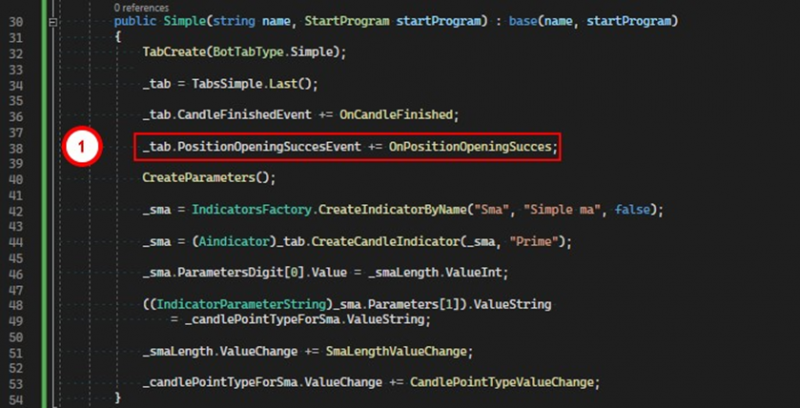
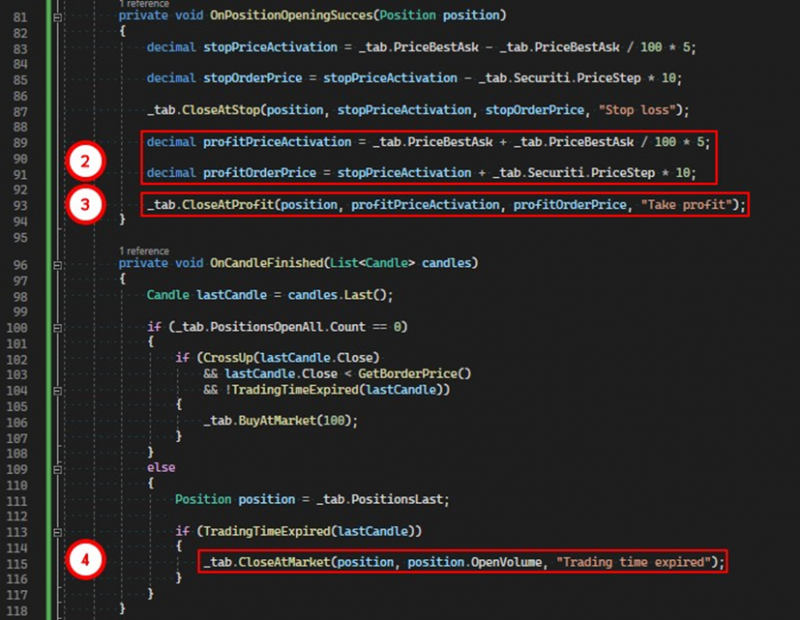
1. Subscribe to the event of successful position opening.
2. In the handler for this event, calculate the order activation price and the price for the order itself.
3. Set the take-profit for the position by calling the CloseAtProfit method.
4. After the set time expires, close the position at the market.
Important note 1:
The take-profit can only be set after the position has been opened, that is, when its open volume is greater than zero. The PositionOpeningSuccesEvent is particularly suitable for this purpose. It signals to the robot that at least one trade has gone through for the opening order. We will set the take-profit in the handler for this event.
public void CloseAtProfit(Position position, decimal priceActivation, decimal priceOrder)The second version of the method performs the same actions but does not take the signal for closure.
Important note 2:
Upon the execution of this type of order, any CloseAtStop order will be canceled if one had been set for the position.
If you have any difficulties or questions, please write to the support chat. Link