Trades on Your Own Account. MyTrade Class in OsEngine.

Let’s talk about trades on our own account. They occur at the moment our orders are executed. In our web terminals, we see them similar to how they appear in the picture above.
1. What is my trade on the exchange?
Private trades are distinguished from anonymous ones by an extended set of information and are only accessible to their owner.
As we know, all trades are generated at the moment orders are executed; therefore, each private trade, in addition to the fields present in anonymous trades, will contain the number of its parent order.
Thus, the process of generating my trade looks like this:
1. You place a buy or sell order.
2. The order is executed, either fully or partially.
3. A record of this is generated by the exchange.
4. We receive a MyTrade. A trade on our account. It can be one or more trades for a single order.
2. The MyTrade Class in OsEngine.
In the project, the MyTrade class is responsible for describing private trades. You can view this primitive on GitHub here.
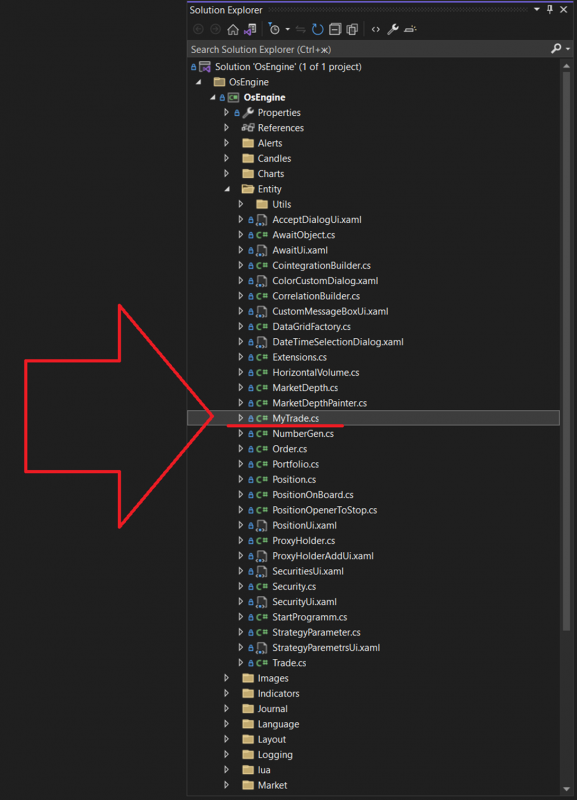
Within the project, this class is located here.
The class itself looks as follows:
Structure of the MyTrade Class:
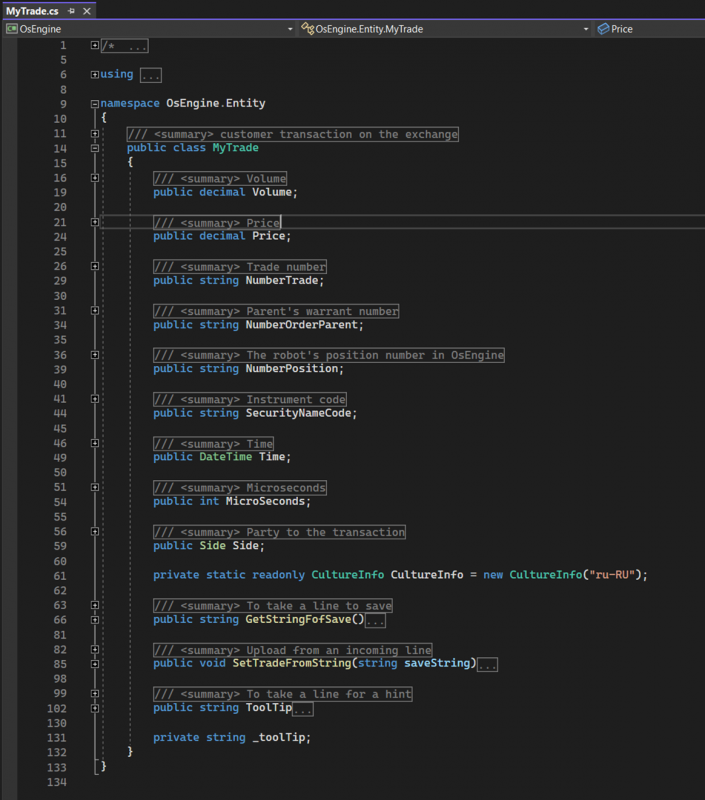
Volume – a public field of type decimal. Stores the volume of the trade.
Price – a public field of type decimal. Contains the price of the instrument at which the trade was executed.
NumberTrade – a public string field, a unique identifier within a specific instrument, assigned by the exchange.
NumberOrderParent – a public string field. Stores the identifier of the parent order, the execution of which led to the creation of this trade.
SecurityNameCode – a public property of type string that contains the name of the asset for which this trade was executed.
Time – a public field of type DateTime. Indicates the date and time when the trading transaction took place.
MicroSecond – a public field of type int. Stores the number of microseconds that have passed since the time indicated in the Time field. It’s important to remember that not all exchanges provide this information. Therefore, in the absence of such information at the exchange, this field will have a value of 0.
Side – a public field of type Side. Indicates the direction of the trade. The direction of the private trade always matches the direction of the parent order.
Values of the Side Enumeration:
None - used when creating objects when the direction of the trade is not defined.
Buy - for purchases.
Sell - for sales.
GetStringForSave – a public method that does not accept parameters. It returns a string that contains all fields of the object for further storage.
SetTradeFromString – a public method. Accepts a string containing data for all fields, parses it, and initializes the state of the object.
ToolTip – a public property of type string. Generates a string representation of the trade for display as a tooltip on the chart when hovering the mouse cursor over the trade.
Happy algorithm trading!
If you have any difficulties or questions, please write to the support chat. Link