OsEngine settings to collect and save custom candles in real-time.
The vast majority of exchanges and APIs provide only Japanese candles for external trading systems. All other types of candles (over 10 in OsEngine) need to be built from the order book or transaction tape, carefully saving them in the file system of your PC. To do this, you need to configure OsEngine correctly. Let's talk about it.
1. Task: set up the saving of transaction tape.
This is necessary so that candles can be built not only online but also from the transaction tape that has already been downloaded.
Go to the connector connection and configure it correctly. Let it be a connector to ALOR:
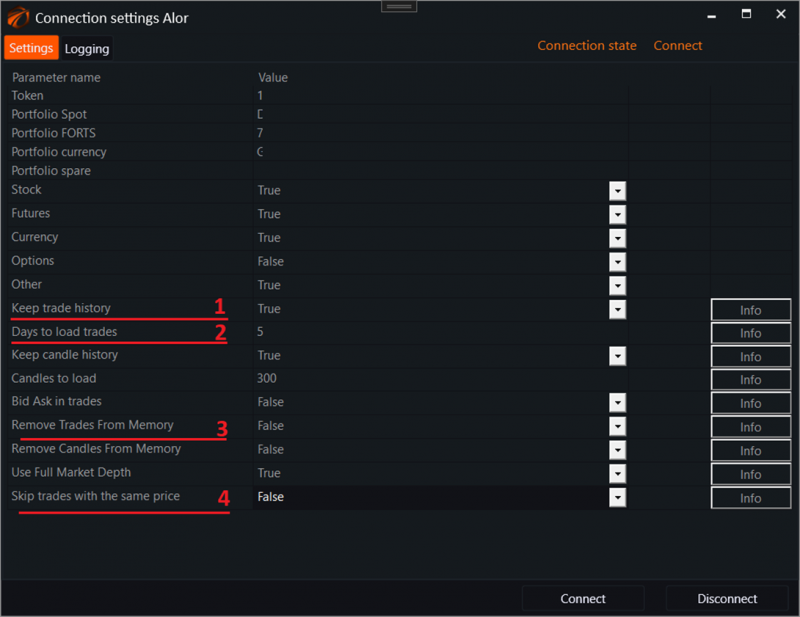
What to pay attention to:
1. Keep trade history - should be set to True. In this case, the transaction tape will be saved to the file system and will be available to all robots. All instruments that your robots subscribe to during trading will be saved.
2. Days to load trades - this is the number of days by trades that will be pulled from the file system after OsEngine is restarted. Set as many as you need. This will greatly affect the consumption of RAM.
3. Remove Trades From Memory - set this setting to False. Otherwise, the transaction tape will be removed from the program's memory. We don't need that...
4. Skip trades with the same price - set to False so that trades with the same price are not skipped. This is necessary for volume-based candle sequences. This increases the CPU load.
2. Task: save transaction tape data inside candles.
For some types of candles and robots, it is necessary for the candle to also store the transaction tape data inside. That is, all trades that took place during the period while the candle was forming. For example, this is needed for a deep calculation of adaptive candles based on Delta, for more than two days. Where is this enabled?
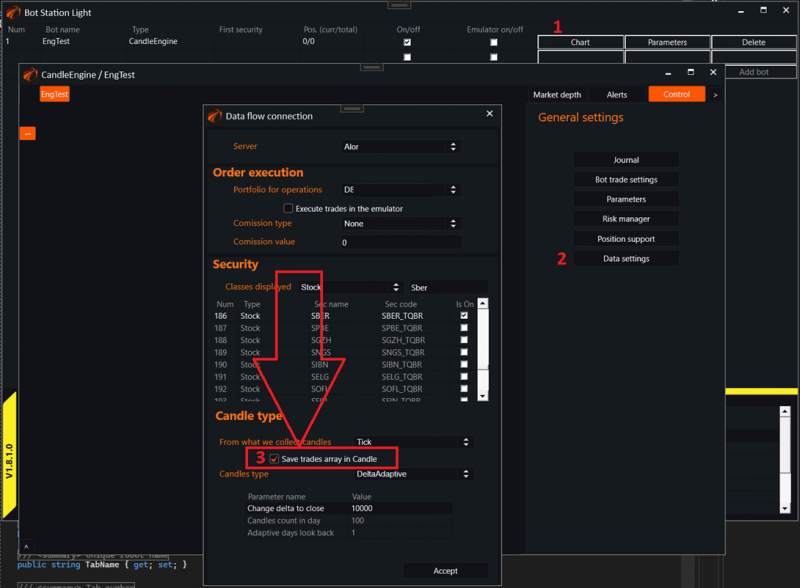
1. Open the chart of a separate robot.
2. Open its data connection settings.
3. There is a checkbox "Save trades array in Candle". You need to enable it. After that, an array with trades that took place during the candle formation time will be formed inside the candle.
4. IMPORTANT!!! This affects the usage of RAM. Do not enable unnecessarily!
Good luck with your algorithms!