SellAtLimitToPosition

public void SellAtLimitToPosition(Position position, decimal priceLimit, decimal volume)The method allows modifying an existing short position by adding a limit order to the list of opening orders. It accepts the following parameters:
1. position – the position that needs to be modified;
2. priceLimit – the price for the new limit order;
3. volume – the volume for the new limit order;
It is important to remember that when calling this method, all active opening orders for this position will be withdrawn.
We are faced with the task of opening a short position using a limit order. However, we want to do this not right at the edge of the spread, but by stepping back from the price a bit in order to improve the entry point. But it often happens that the price moves away from our order. In such cases, we will relocate the opening order if it has not been filled.
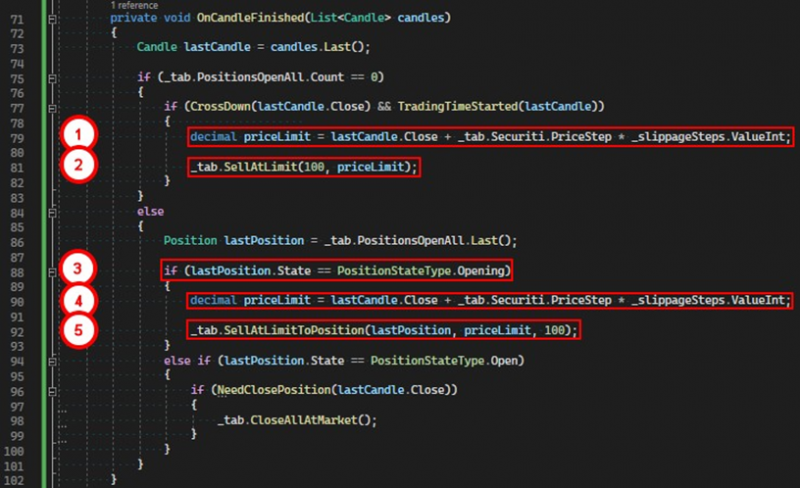
1. We calculate the price for the order, retreating 10 price steps upward from the closing price of the last candle.
2. We command the tab to open a short position using a limit order.
3. After creating the position, at the next candle completion event, we determine the position's status.
4. If it is still not opened, we calculate a new price for the order, retreating 10 price steps from the closing price of the last candle.
5. We call the method SellAtLimitToPosition, passing our position, the new price, and the volume.
After these operations, the tab will cancel the past sell order and create a new one with the current price. In the log, in the details window, we can see for which positions this condition was met.
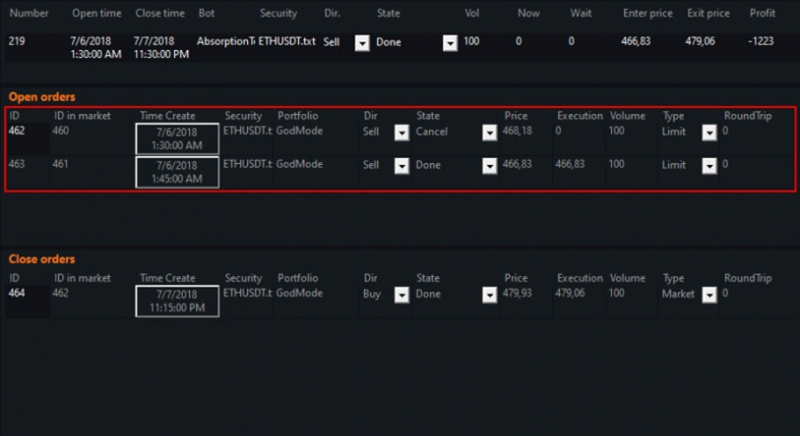
To open this window, double-click on the position in the log.
If you have any difficulties or questions, please write to the support chat. Link