SellAtFake

public Position SellAtFake(decimal volume, decimal price, DateTime time)1. volume – the transaction volume;
2. price – the order price at which the position will be considered open;
3. time – execution time set by the user;
This method is designed to create fake short positions. After calling this method, the tab creates a full-fledged position. The only difference from a real one is that no orders are sent to the exchange. Thus, the robot believes it's its position and processes it according to all the rules.
Such behavior may be useful in several cases. For example, you have opened a position in another terminal and now want to transfer it to OsEngine so that the robot can manage it.
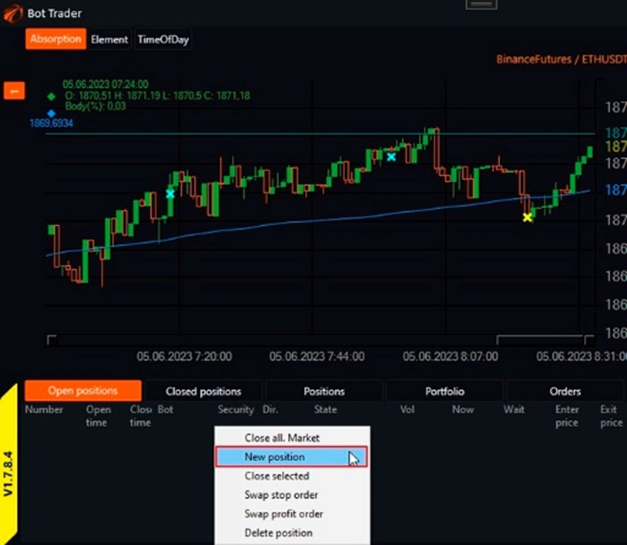
In OsTrader, access to this feature can be obtained in the positions table. You need to call the context menu by right-clicking and selecting the option to create a position:
A position management window will open:
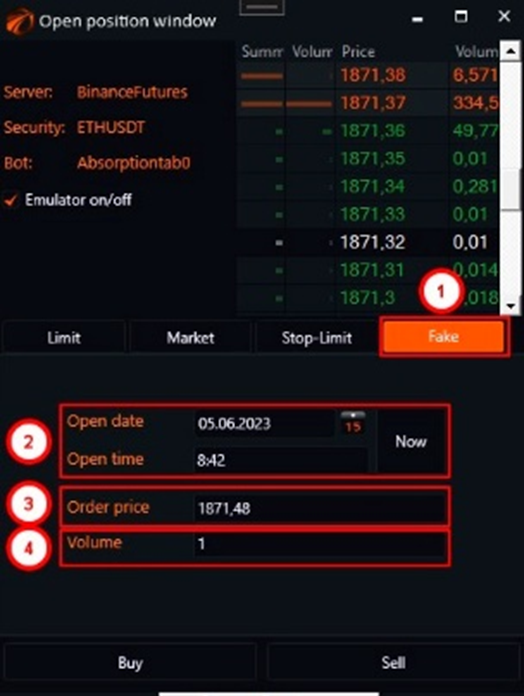
1. go to the Fake tab;
2. set the date and time;
3. set the price. You can select the required level in the order book, and the price will be inserted automatically;
4. set the transaction volume;
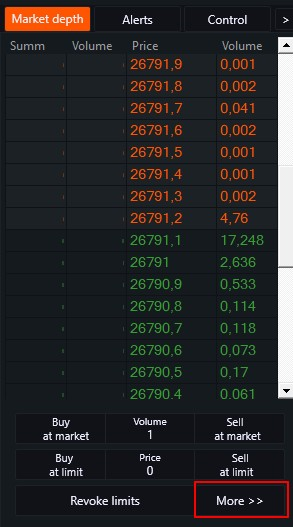
In OsTrader Light, you can access this window by pressing the "More" button:
If you have any difficulties or questions, please write to the support chat. Link