Risk manager.
During robot trading, you can set up a stop process when a certain drawdown is reached. This is done using the built-in risk manager in OsEngine. You can call it for a specific robot like this:
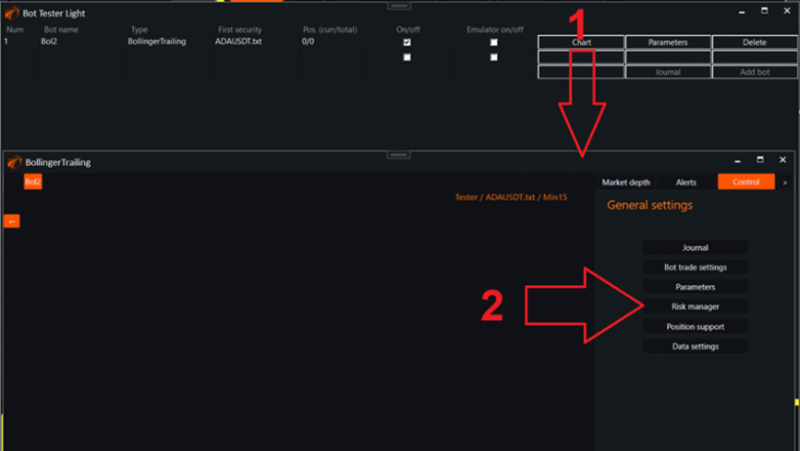
1. Open the control window for the individual robot.
2. Call the risk manager.
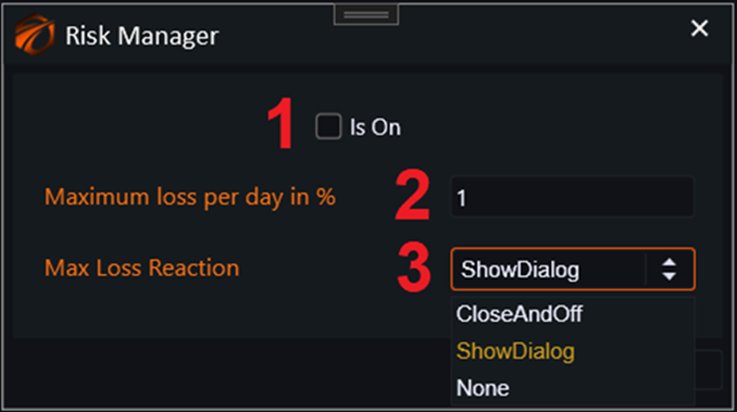
1. Enabled or disabled.
2. Maximum drawdown to deposit within the day.
3. Reaction to exceeding drawdown:
a. CloseAndOff - turn off and close all positions.
b. ShowDialog - open a notification window.
c. None - no action.
IMPORTANT!!!
On cryptocurrency exchanges, if you are trading on a SPOT platform, this is unlikely to work, as there is no unified deposit, and it is unclear relative to which security to calculate the maximum drawdown. Be careful.
If you encounter any issues or have any questions, please write to the support chat, link.