Location BotTabSimple in the OsEngine project and general description of its capabilities.
BotTabSimple is the main combat unit in the program that provides robots access to all data streams coming from the trading platform, as well as all the functionality for making transactions. It can be seen as an intermediary between the trading algorithm and other modules of the program, such as the connector, transaction log, position maintenance module, means of visual data display (charts, order books), and others. BotTabSimple is related to all the listed modules by a "composition" relationship, meaning it simply cannot exist without them.
BotTabSimple can only work with one instrument at a time. If a robot needs to work with multiple instruments within the same instance, a separate tab must be added for each security. It's worth noting that there are several types of tabs for different types of robots in the program, which will be discussed in the following sections. For simplicity, BotTabSimple is referred to as a simple tab. The code for the described class can be found in the BotTabSimple.cs file in the OsEngine\project\OsEngine\OsTrader\Panels\Tab\ directory.
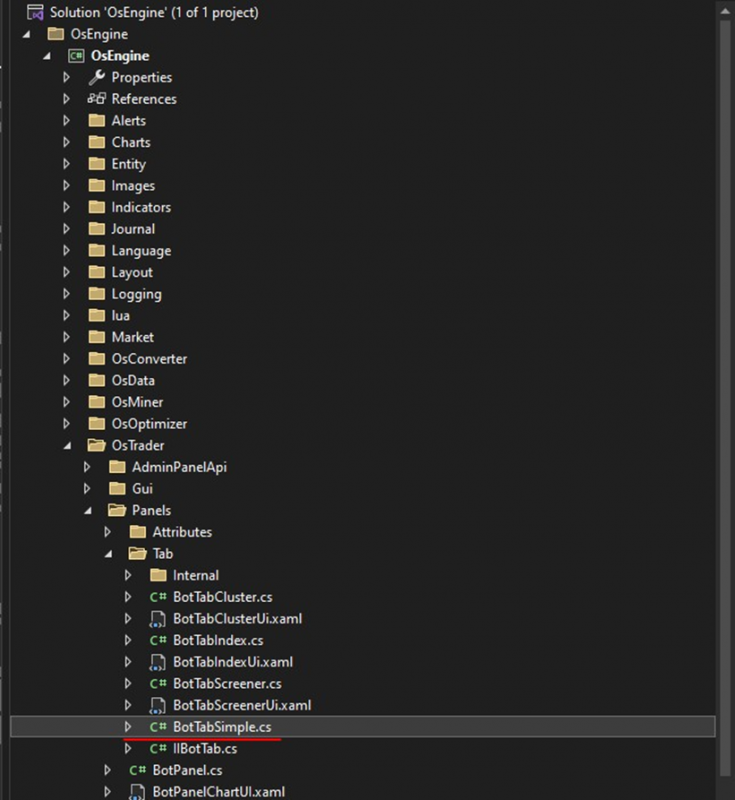
Figure 1. Location of the BotTabSimple class in the project structure.
The process of creating a simple tab in a robot looks as follows:
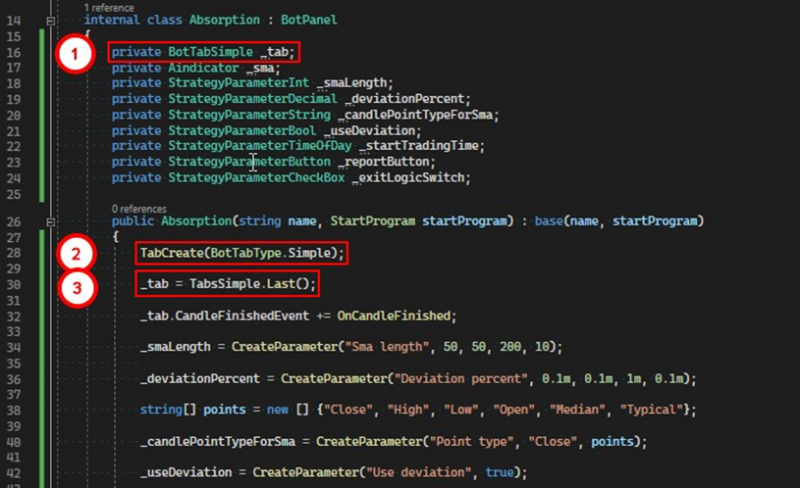
Figure 2. Creating a simple tab.
1. Create a private field of type BotTabSimple.
2. Call a method from the base class TabCreate. The method accepts a parameter of the BotTabType enumeration, in our case Simple.
3. Save the reference to the tab in the previously created field.
If you have any difficulties or questions, please write to the support chat. Link