Introduction to OsEngine.

1. What is OsEngine?
OsEngine is a trading terminal for robots. It is a complete ecosystem for the full cycle of algorithmic trading.

It includes:
A robot creation layer similar to Wealth-Lab script and Ninja script. It is very simple. We do not change it with each release and maintain backward compatibility.
OsData - a program for downloading historical data, with which you can receive candles, order books, and ticks from various sources.
Optimizer - a program for finding optimal parameters for a strategy.
Tester - an exchange emulator. A program for testing multiple strategies simultaneously on historical data, with a unified portfolio. Supports multiple timeframes and instruments simultaneously.
Miner - a program for finding profitable patterns on charts, both manually and automatically. Works with Big Data on your computer. The patterns found with this program can be used in trading.
Bot station - a program for launching robots in trading.
And much more...
Overall, this is everything you need to trade with robots.
2. Os Engine expands the capabilities of robots and speeds up their development.
As a platform specializing in creating robots, Os Engine significantly expands the capabilities of robots and speeds up their development:
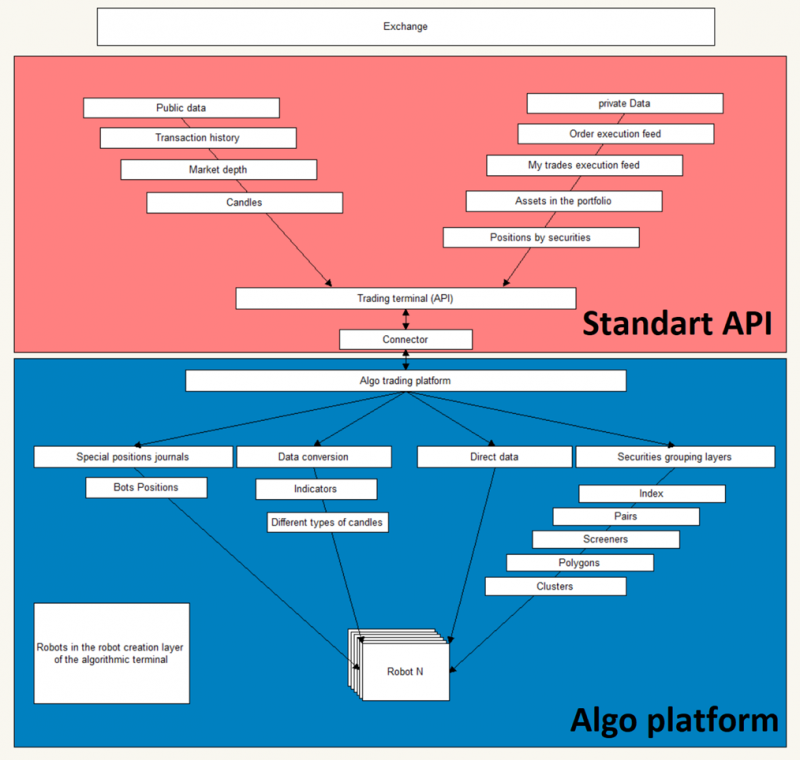
In the standard exchange API, you have:
1. Public data:
a. Trade feed.
b. Order book snapshots.
c. Candlesticks.
2. Private data:
a. Client orders.
b. Client trades.
c. Portfolio positions.
OsEngine adds several levels of abstraction to this:
1. Special logging, allowing each robot to track its positions.
2. Methods to transform basic public data:
a. New types of indicators.
b. New types of candlesticks. Including Renko, Heiken Ashi, Delta, Clusters, etc.
3. Multiple levels of abstraction for working with sources:
a. Indexing. Building indexes using classic schemes (Equal weighted / Volume weighted / Price weighted) in just a few lines of code.
b. Pair trading in just a few dozen lines of code. Using the most advanced methods of Correlation and Cointegration analysis.
c. Screening sources for trading hundreds of instruments simultaneously in just a few dozen lines of code.
d. Layer for Currency (triangular) arbitrage. With ready-made visual interfaces.
e. Layer for robot trading on Horizontal volumes in just a few dozen lines of code.
Thus, Os Engine significantly speeds up the development of trading robots, accelerating the business processes of traders around the world.
3. How to download?
Go to GitHub: https://github.com/AlexWan/OsEngine
GitHub is an international repository for open-source software.
On the page, you will see a green button labeled Code.

When you click on it, a menu will pop up:

Click on "Download ZIP" and the file download will start.
4. What did we download from GitHub?
Unpack the ZIP archive.
The first thing you need to do is unpack the ZIP archive, otherwise nothing will work.
OsEngine - an open-source program.
In addition to the executable file in the archive, it also contains all the source code of this program.
In the folders Project and related projects.
For non-programmers.
You should be interested in this folder inside the archive, as it contains the terminal itself:

1. This is an exe file. You can run the program with it.
2. These are folders where you should have a general understanding of what is happening.
For programmers.
The projects are located here:

Everything is written in C#. The recommended development environment is Visual Studio Community.
However, I suggest starting with getting familiar with the terminal itself.
5. FAQ - everything you need!
Link RU: https://o-s-a.net/os-engine-faq
Link ENG: https://os-engine-eng.com/faq

Here you can find around 200 articles on the structure and operation of OsEngine. 98% of all your questions can be answered here.
6. Support chat.
Additionally, you can always write to us in the support chat. We will be happy to assist you:
RU: https://t.me/osengine_official_support
ENG: https://t.me/osengine_support_english
7. License.
Has restrictions.
Details here: https://o-s-a.net/os-engine-license-about
IMPORTANT!!!
If you haven't installed the necessary .Net 9 updates, various errors may occur when launching the application.
Make sure to restart Windows after any updates.
Also, if you are installing Visual Studio to work with the source code of the robots, do not forget to restart Windows afterwards.
Fail Fast Exception.
During the application launch, you may encounter the following error:

This means you need to update Windows.
Good algorithms for this!