Index in OsEngine. We assemble it according to our own formula.

In this article, we will learn how to assemble an index in OsEngine. Initially, we will do it according to our own formula. Let's look at the interfaces and discuss the general concept.
We will assemble it in the tester. Remember, in reality, it's more or less the same.
1. Download data.
To start, we will need two sets of data. For crypto and sectoral data on Russian oil companies.
Download oil companies data from the MoexDataServer (IIS) server:

Set name: MoexIisGasOil.
Here we have 5-minute data from 2022 to:
1. Gazprom.
2. Lukoil.
3. Rosneft.
4. Tatneft.
And download 5-minute data from Binance Spot using OsData from the beginning of 2023. Here, we have the beginning of the list of all securities from Binance, around 50 in total.

Set name: Binance5Min.
2. Create two robots with a source type "BotTabIndex".
There are many free robots in the project, so we don't need to create anything new. Create two robots of the "OneLegArbitrage" type:

Important!!! This is an example of a one-legged arbitrage with several dozen lines of code. Do not try to use it directly! Our one-legged arbitrage, for example, has long exceeded 1000 lines of code in volume. It is not that simple. However, as an example of data connection, this robot is perfect.
3. Go to the tester. Connect crypto data.
To do this, open the exchange emulator settings and select the "Binance5Min" set that you downloaded earlier.

4. Configure the robot.
Select the previously created robot, click on "Chart" to enter its personal window, and then go to "Data Settings."

In the data settings, click on the plus sign to open the window for connecting securities in the index, and select the necessary ones.
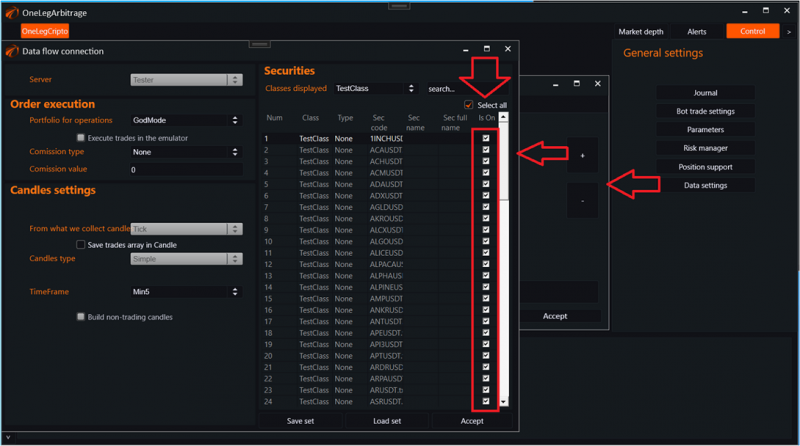
After that, the window settings for the data source for the index should show the list of securities we connected to it.

And in the red rectangle, we enter the formula.
What this specific formula does:

If you start the tester for data playback, you will see how the index is built according to our formula.

To learn how to work with the auto-configurable formula, check out the next articles.
If you have any difficulties or questions, please write to the support chat. Link
OsEngine: https://github.com/AlexWan/OsEngine