Index in OsEngine. Autoformula.

In this article, we will learn how to assemble an index in OsEngine using an autoformula. Let's look at the interfaces and discuss the general concept. We will assemble it in the tester. Remember, in reality, it's more or less the same.
1. We have already downloaded the data.
In the previous article on the topic, we downloaded two sets of data with you. Today we will need data on the Russian market, specifically the oil sector. We will build a sectoral index weighted by volume. Remember, we downloaded oil companies data using OsData from the MoexDataServer (IIS) server:

Set name: MoexIisGasOil.
Here we have 5-minute data from 2022 for:
1. Gazprom.
2. Lukoil.
3. Rosneft.
4. Tatneft.
2. Create a robot with the source "BotTabIndex".
A robot of the "OneLegArbitrage" type:

Important!!! This is an example of a one-legged arbitrage with several dozen lines of code. Do not try to use it directly! Our one-legged arbitrage, for example, has long exceeded 1000 lines of code in volume. It's not that simple. However, as an example of data connection, this robot is perfect.
3. Go to the tester. Connect data from MOEX.
To do this, open the exchange emulator settings and select the "MoexIisGasOil" set that you downloaded earlier.

4. Configure the robot.
Select the previously created robot, click on "Chart" to enter its personal window, and then go to "Data Settings."

In the data settings, click on the plus sign to open the window for connecting securities in the index, and select the necessary ones.

After that, go to the index settings tab for the "Autoformula":

1. Set the index formula to be rebuilt once a day.
2. At 10 a.m., we want it to rebuild the formula.
3. Check the box "make a record in the log when rebuilding the index."
4. Choose the type of securities sorting "FirstInArray", meaning all in a row. Use all four.
5. Distribute the multipliers using the volume weighting method "VolumeWeighted."
6. Set the depth of volume analysis to 20 days.
Turn on the tester and...

The formula and index are rebuilt every day at 10 a.m.
5. Details of Autoformula Settings.
Let's see what settings the autoformula has:
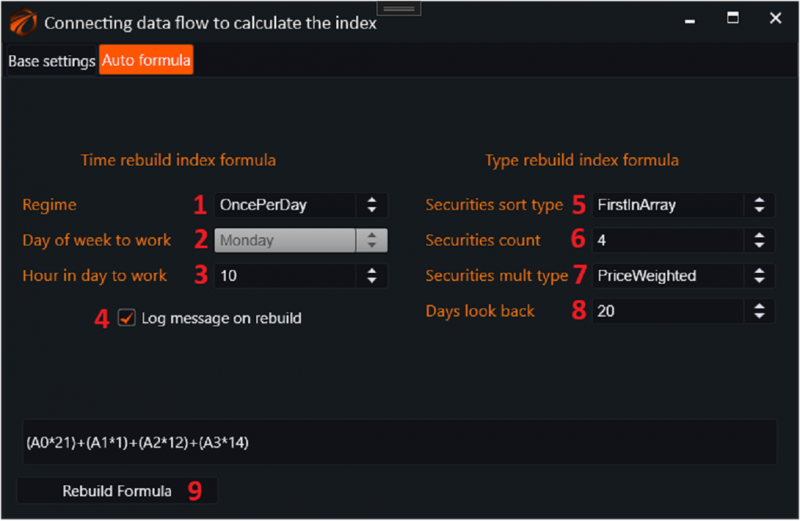
1. Regime
a. Off - off.
b. OncePerWeek - once a week.
c. OncePerDay - once a day.
d. OncePerHour - once an hour.
2. Day of week to work - the day for rebuilding the index formula, if OncePerWeek mode is selected.
3. Hour in day to work - the hour for rebuilding the index formula, if OncePerWeek or OncePerDay mode is selected.
4. Log message on rebuild - whether to make a record in the emergency log after rebuilding the index formula.
5. Type of sorting and selection of securities in the final formula:
a. FirstInArray - first in the array of securities. i.e. by list and without sorting.
b. VolumeWeighted - weighted by volume. The heaviest securities will be selected first in the index, in decreasing order. Volumes are calculated over a depth of Days look back.
c. MaxVolatillityWeighted - the first securities in the index will include securities with the maximum average intraday volatility over Days look back.
d. MinVolatilityWeighted - the first securities in the index will include securities with the minimum average intraday volatility over Days look back.
6. Securities count - the number of securities that will be included in the index.
7. Security mult type - the type of weighting of securities in the index. i.e. how multipliers will be distributed.
a. PriceWeighted - weighted by price.
b. VolumeWeighted - weighted by volume.
c. EqualWeighted - equal weighting.
8. Days look back - the period over which data is taken for calculations when sorting instruments in the index and weighting them.
9. Quick recalculation button of the index formula based on current settings.
If you have any difficulties or questions, please write to the support chat. Link
OsEngine: https://github.com/AlexWan/OsEngine