BuyAtStop

The BuyAtStop methods series is designed for delayed opening of long positions using conditional orders. After calling the method, an object of the PositionOpenerToStopLimit class is created in the tab, which contains data on the conditional order. We will refer to it as a conditional position.
Let's consider the principle of action for conditional orders. Essentially, this is a regular order, but it is only sent to the exchange when certain conditions are met. Let's take a hypothetical instrument whose current price is 100 units. We want to buy one lot when the price exceeds the mark of 120 units. At the current setup, this cannot be done, but we can program a condition so that when the price reaches 120, an order to buy one lot is sent to the exchange.
public void BuyAtStop(decimal volume, decimal priceLimit, decimal priceRedLine, StopActivateType activateType, int expiresBars, string signalType, PositionOpenerToStopLifeTimeType lifeTimeType)The method does not return anything. It accepts the following parameters:
1. volume – the volume for the opening order;
2. priceLimit – the price for the order;
3. priceRedLine – the price upon reaching which the order will be sent to the exchange;
4. activateType – the type of activation. It is necessary to use a value that is equal to or greater;
5. expiresBars – the lifetime of the order, measured by the number of candles (bars);
6. signalType – a string containing the name of the signal to open the position;
7. lifeTimeType – enables/disables the calculation of the life time for the order;
Let's recall our example. The robot opens a long after the price deviates upward by a certain percentage from the current value of the SMA. The algorithm's calculation is triggered after the closing of another candle, but while we wait for its closure, the price may move much further away from the needed border. To solve this problem, we will use the BuyAtStop method. If the price deviates by the required amount, the program will automatically open a long position.
Let's modify our example:
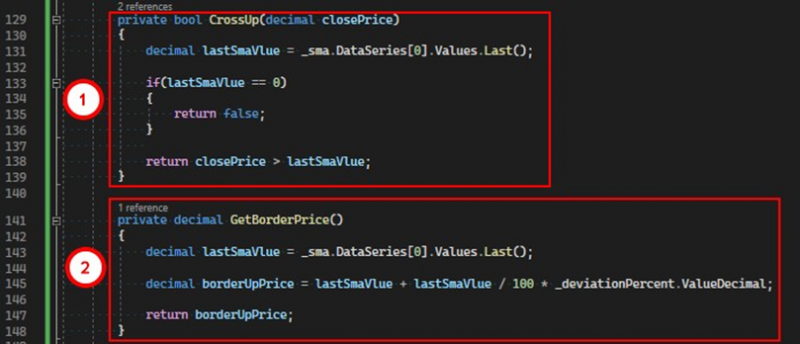
1. Let's modify the CrossUp method. It will inform us if the price is above the moving average.
2. We will add the GetBorderPrice method, which will calculate and return the price considering the deviation.
And further, let's change the candle close event handler:
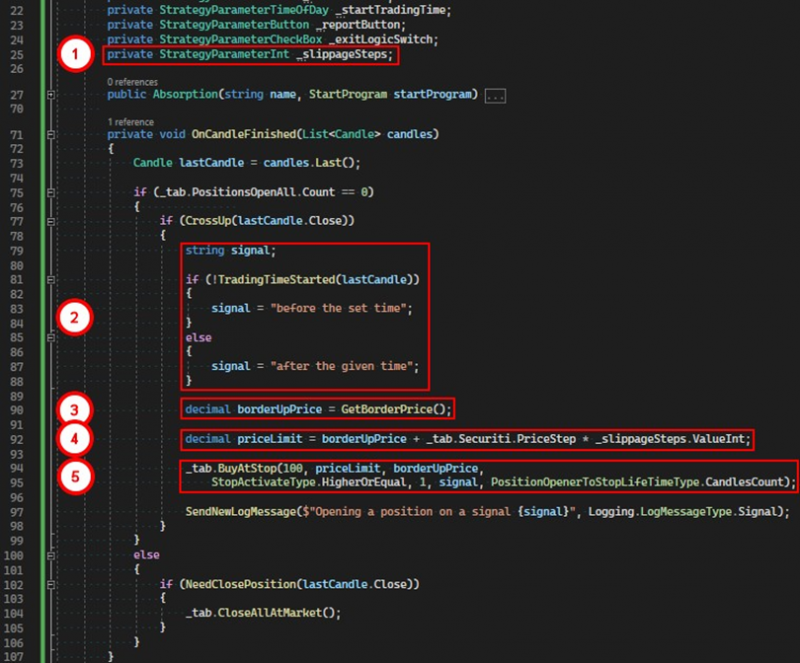
1. Create a parameter of type int. With its help, we will set the permissible slippage.
2. Determine the signal for opening.
3. As a condition, we use the price upon reaching which the tab will open a long position.
4. Calculate the price at which the order will be sent the moment the condition is triggered, taking into account the slippage.
5. Issue a command to the tab to open a long position when reaching the boundary value.
As a parameter for expiresBars, we set the value to 1. This means that the conditional position will exist for the duration of one candle before it is canceled. Our algorithm will recreate the conditional position after the completion of each candle, as long as the instrument's price remains above the moving average.
If necessary, a different approach can be used. Let's create a conditional position with an unlimited life span.
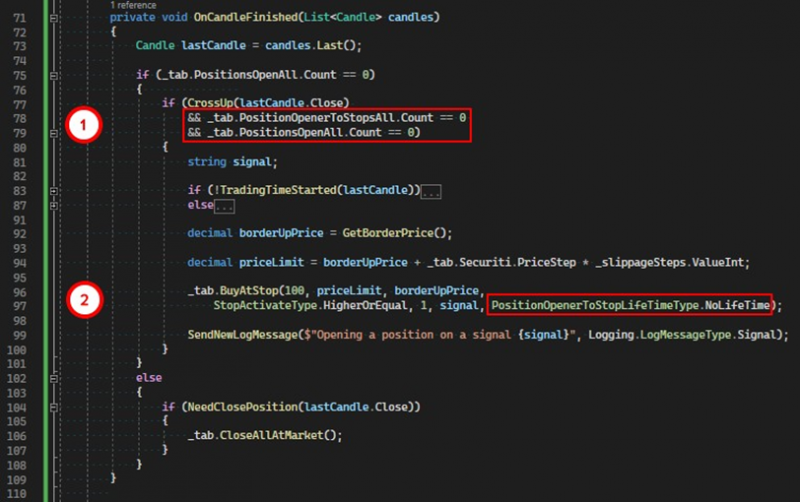
1. We add two additional checks: there should be no active conditional positions and no active regular positions in the tab.
2. As the last parameter to the BuyAtStop method, we pass the value NoLifeTime.
Thus, the conditional position will not be canceled until a real position is created.
The BuyAtStop method has multiple overloads. They all differ only in the set of accepted parameters. The version with the most parameters carries all functionalities, while the others call it, passing literals as some of the method parameters.
public void BuyAtStop(decimal volume, decimal priceLimit, decimal priceRedLine, StopActivateType activateType, int expiresBars, string signalType)An overload of the method that does not require the lifeTimeType parameter by default uses the CandlesCount value to calculate the life time for the conditional position.
public void BuyAtStop(decimal volume, decimal priceLimit, decimal priceRedLine, StopActivateType activateType, int expiresBars)A version of the method that does not require the signalType and lifeTimeType parameters. By default, an empty string is used for the signal and the CandlesCount value for calculating the lifespan of the conditional position.
public void BuyAtStop(decimal volume, decimal priceLimit, decimal priceRedLine, StopActivateType activateType, string signalType)Does not require expiresBars and signalType parameters. By default, it uses one for expiresBars and the CandlesCount value to calculate the life time for the conditional position.
public void BuyAtStop(decimal volume, decimal priceLimit, decimal priceRedLine, StopActivateType activateType)Does not require the expiresBars, signalType, and lifeTimeType parameters. By default, it uses one for expiresBars, an empty string for the signal, and the CandlesCount value for calculating the life time of the conditional position, respectively.
If you have any difficulties or questions, please write to the support chat. Link