BuyAtLimitToPosition

public void BuyAtLimitToPosition(Position position, decimal priceLimit, decimal volume)The method allows modifying an existing long position by adding a limit order to the list of opening orders. It accepts the following parameters:
1. position – the position that needs to be modified;
2. priceLimit – the price for the new limit order;
3. volume – the volume for the new limit order;
It is important to remember that when this method is called, all active orders to open this position will be canceled.
Our task is to open a long position using a limit order. However, we want to do this not at the very edge of the spread, but by stepping back from the price a bit to improve the entry point. But often, the price moves away from our order. In such a case, we will reposition the order for opening if it has not been executed.
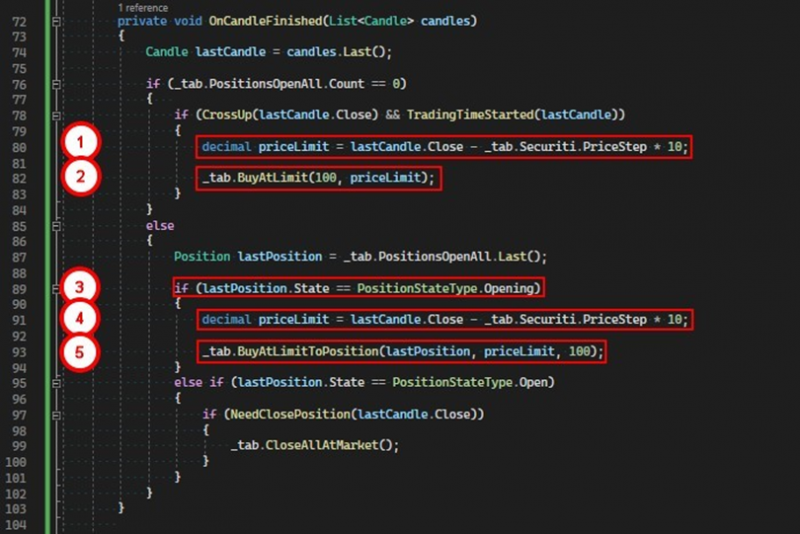
1. Calculate the price for the order, stepping back from the close price of the last candle by 10 price steps downwards.
2. Issue a command to the tab to open a long position using a limit order.
3. After the position has been created, at the next candle close event, determine the status of the position.
4. If it still has not been opened, calculate a new price for the order, stepping back from the close price of the last candle by 10 price steps.
5. Call the BuyAtLimitToPosition method, passing our position, the new price, and the volume.
After the operations are completed, the tab will cancel the previous order and create a new one with the current price. In the log, in the detailed information window, we can see for which positions this condition has been met.
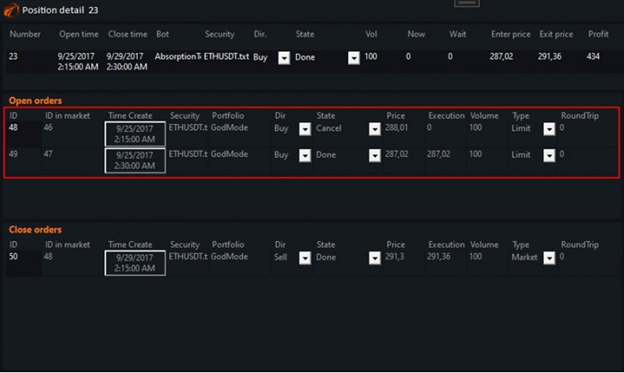
To open this window, you need to double-click on the position in the log.
If you have any difficulties or questions, please write to the support chat. Link