BuyAtFake

public Position BuyAtFake(decimal volume, decimal price, DateTime time)1. volume – the volume of the transaction;
2. price – the order price at which the position will be considered open;
3. time – the execution time set by the user;
This method is designed to create fake long positions. After calling this method, the tab creates a full-fledged position, the only difference from a real one being that no orders are sent to the exchange. Thus, the robot thinks it is its position and processes it according to all the rules.
Such behavior can be useful in a number of cases, for example, if you have opened a position in another terminal and now want to transfer it to OsEngine so that the robot can manage it.
In OsTrader, access to this functionality can be obtained in the positions table. Right-click to invoke the context menu and select the option to create a position:
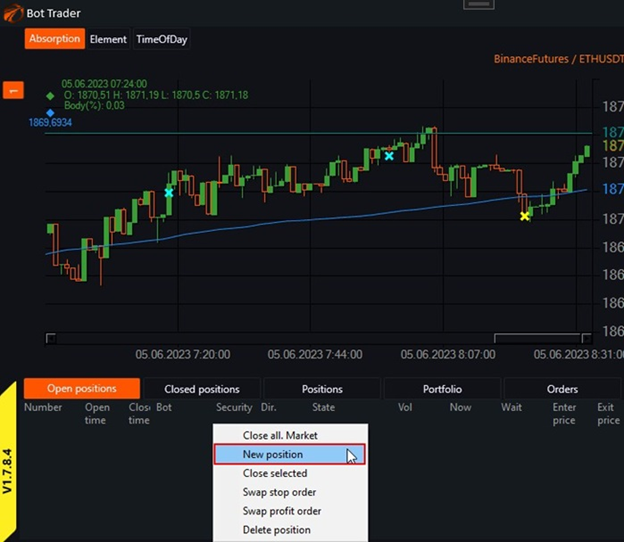
A position management window will open:
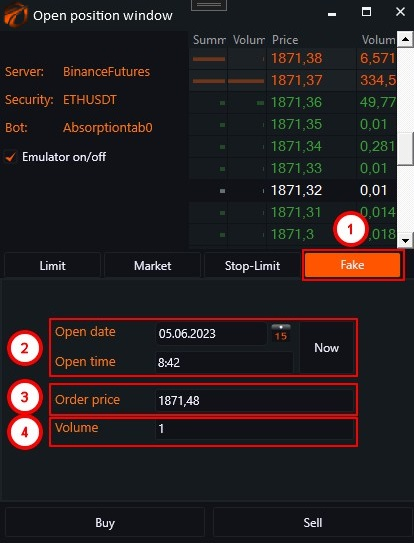
1. Go to the Fake tab;
2. Set the date and time;
3. Set the price. You can select the desired level in the order book, and the price will be inserted automatically;
4. Set the volume of the transaction;
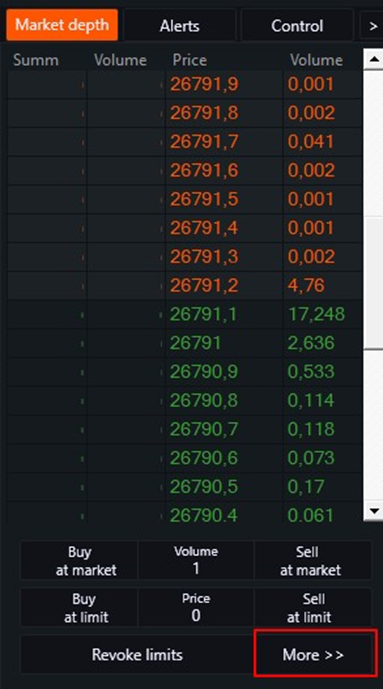
In OsTrader Light, access to this window can be obtained by pressing the "More" button.
If you have any difficulties or questions, please write to the support chat. Link